


應用說明
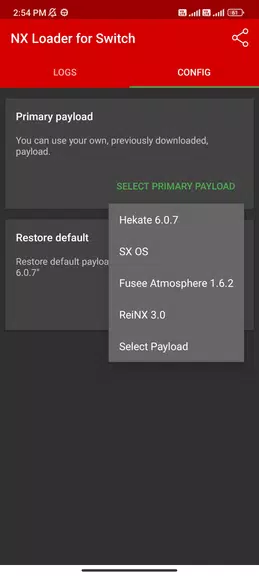
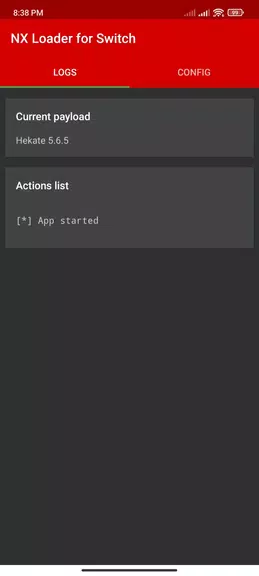
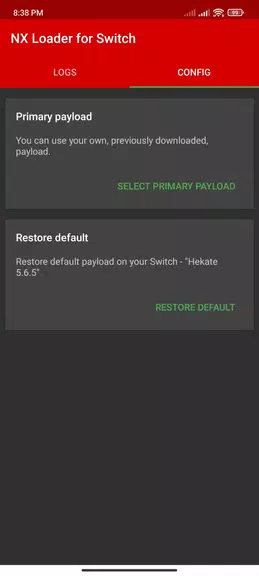
Meet NX Loader for Switch, the revolutionary app that transforms how Nintendo Switch users manage their systems. 遇見適用於Switch的NX Loader,這款革命性應用徹底改變了任天堂Switch使用者管理系統的方式。 This cutting-edge tool lets you effortlessly inject the latest payloads for Hekate, SX OS, Fusee, and ReiNX using just your Android phone and a USB cable. 這款前沿工具讓您只需使用安卓手機和USB資料線即可輕鬆注入Hekate、SX OS、Fusee以及ReiNX的最新payload。 No data access permissions are needed. 無需任何資料訪問許可權。 Simply open the app, optionally choose a custom payload file, connect your phone to the Switch via an OTG cable, enter RCM mode, grant the one-time permission, and you're done. 只需開啟應用,可選擇自定義payload檔案,透過OTG線將手機連線至Switch,進入RCM模式並授予一次性許可權即可完成操作。 Experience smooth, hassle-free payload injection. 體驗流暢且無繁瑣操作的payload注入過程。
Key Features of NX Loader for Switch:
* Intuitive Interface: The app features a clean, user-friendly design that makes injecting your payload.bin file straightforward. * 直觀介面:應用採用簡潔易用的設計,使您能夠輕鬆完成payload.bin檔案的注入。
* Broad Payload Support: NX Loader for Switch is compatible with the newest payloads for Hekate, SX OS, Fusee, and ReiNX, offering extensive flexibility. * 廣泛的Payload支援:適用於Switch的NX Loader相容Hekate、SX OS、Fusee和ReiNX的最新payload,提供極高的靈活性。
* No Data Permissions Required: Your personal data stays private and secure, as the app does not request any access permissions. * 無需資料許可權:由於應用不請求任何訪問許可權,您的個人資料將保持私密與安全。
* Simple Injection Method: Using a standard USB cable with your Android device, you can quickly inject the payload.bin file into your Nintendo Switch. * 簡單的注入方法:使用安卓裝置配合標準USB資料線,即可快速將payload.bin檔案注入至任天堂Switch主機。
Frequently Asked Questions:
* Do I need to buy extra hardware to use this app? Answer: Yes, you will need an OTG (On-The-Go) cable to connect your phone to the Nintendo Switch for the injection process. * 使用此應用是否需要購買額外硬體? 答:是的,您需要一根OTG(通用序列匯流排)資料線將手機連線至任天堂Switch以完成注入過程。
* Is there a detailed guide on using the app? Answer: Absolutely. The app includes clear, step-by-step instructions for launching the app, selecting a custom payload file, and placing your Switch into RCM mode. * 是否有詳細的應用使用指南? 答:當然有。應用內包含清晰的分步說明,指導您啟動應用、選擇自定義payload檔案以及將Switch切換至RCM模式。
* Will NX Loader for Switch work on my Android device? Answer: The app is designed to work on most modern Android devices that support USB connectivity. * 適用於Switch的NX Loader是否相容我的安卓裝置? 答:該應用專為支援USB連線的大多數現代安卓裝置設計,能夠正常執行。
Final Thoughts:
With its intuitive interface, wide payload compatibility, and streamlined injection process, NX Loader for Switch provides a reliable and convenient solution for Nintendo Switch users. The fact that it requires no data access permissions ensures your personal information remains protected. Just follow the in-app instructions to inject your payload seamlessly and enhance your Nintendo Switch experience. Download NX Loader for Switch today and take your gaming to the next level.
總結:
憑藉其直觀的介面、廣泛的payload相容性以及簡化的注入流程,適用於Switch的NX Loader為任天堂Switch使用者提供了可靠且便捷的解決方案。無需資料訪問許可權的特性確保了您的個人資訊始終受到保護。只需按照應用內的說明操作,即可無縫完成payload注入並提升您的Switch遊戲體驗。立即下載適用於Switch的NX Loader,讓您的遊戲樂趣更上一層樓。
NX Loader for Switch應用截圖
用戶評價
發表評價
熱門遊戲
熱門應用









最新文章
更多
弗林斯最佳陣容與隊伍指南
Sep 16,2026
Indemni 透過性格測試讓你成為自己的英雄,即將上線
Sep 13,2026
Plug In Digital 推出鮑魚桌遊
Sep 13,2026
網易全新都市風RPG《ANANTA》:我們目前掌握的全部資訊
Sep 12,2026
《寶可夢GO》將在2025年世界錦標賽前推出多項慶典活動
Sep 10,2026
《Polytopia》全球世界錦標賽將於今秋拉開帷幕
Sep 10,2026